
What it does
- Scheduled Feeding creates a daily, weekly, or monthly routine at a chosen time instead of relying on memory.
- The schedule is connected to a food category, product, quantity, optional automatic-feeder flag, and available nutrition facts.
- The resulting care task remains distinct from the one-time feeding log so planned cadence and completed events are not confused.
Why you would use it
A schedule answers what should happen and when; a feeding log answers what actually happened. Keeping those concepts separate makes routines easier to follow, hand off, and review without inventing completed feedings from a plan.
How to use it
Start here: Start from the correct tank, choose Maintenance, open Feeding, then select Create Scheduled Feeding.
- Open the correct tank, choose Maintenance, select Feeding, and choose Create Scheduled Feeding.
- Choose Daily, Weekly, or Monthly, then set the intended feeding time.
- For weekly or monthly schedules, choose the correct day or date when the additional controls appear.
- Select the actual food category and food, then enter the amount intended for each occurrence.
- Turn on Auto-feed only when an automatic feeder performs this routine; leave it off for a person-completed feeding.
- Review the available nutrition facts and estimated load, save the schedule, and treat each completed occurrence as real care history rather than assuming the plan was followed.
Feeding Schedules screenshots
This capture comes from the current Reef Trak interface. Numbered callouts identify the key controls; the text guide carries the full workflow.
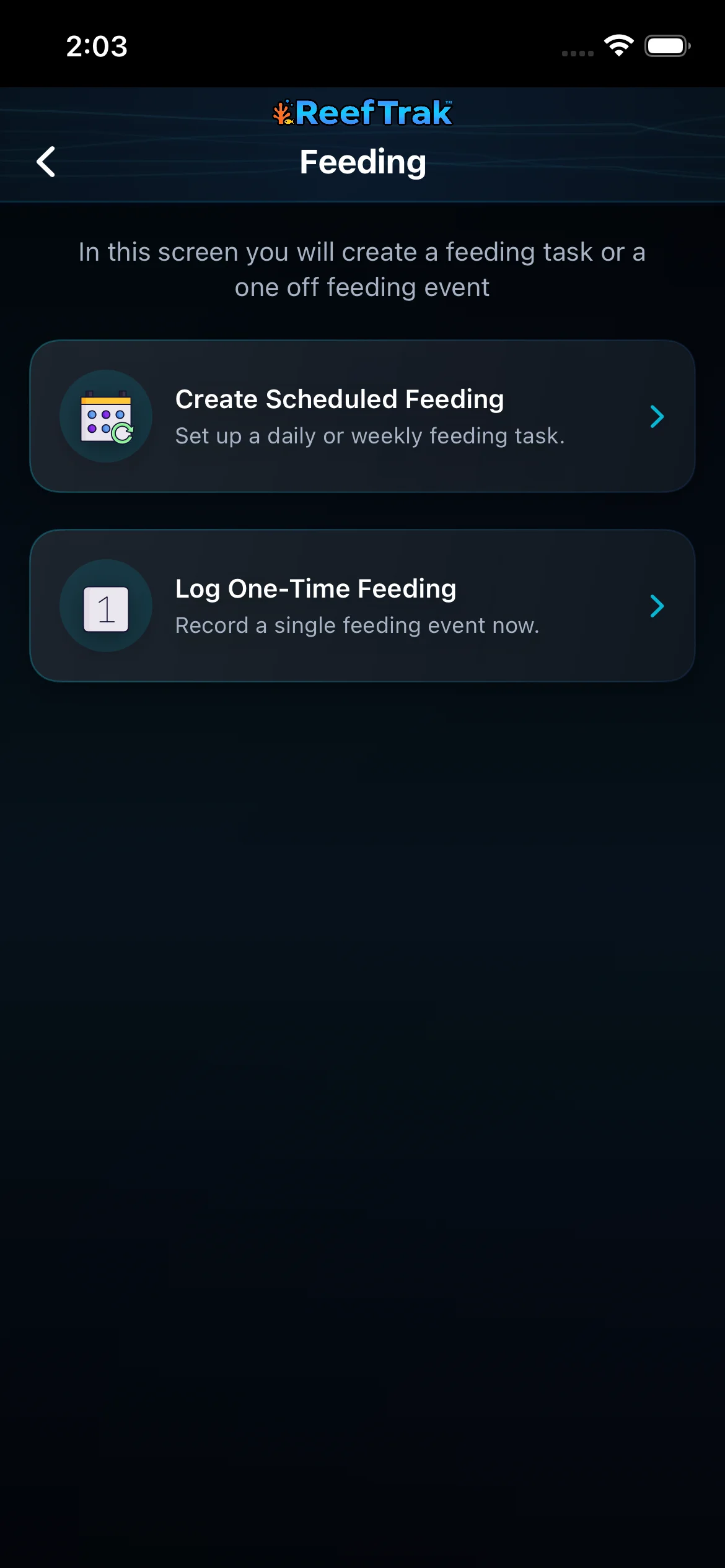 1
1
- Choose Create Scheduled Feeding for a repeated routine.
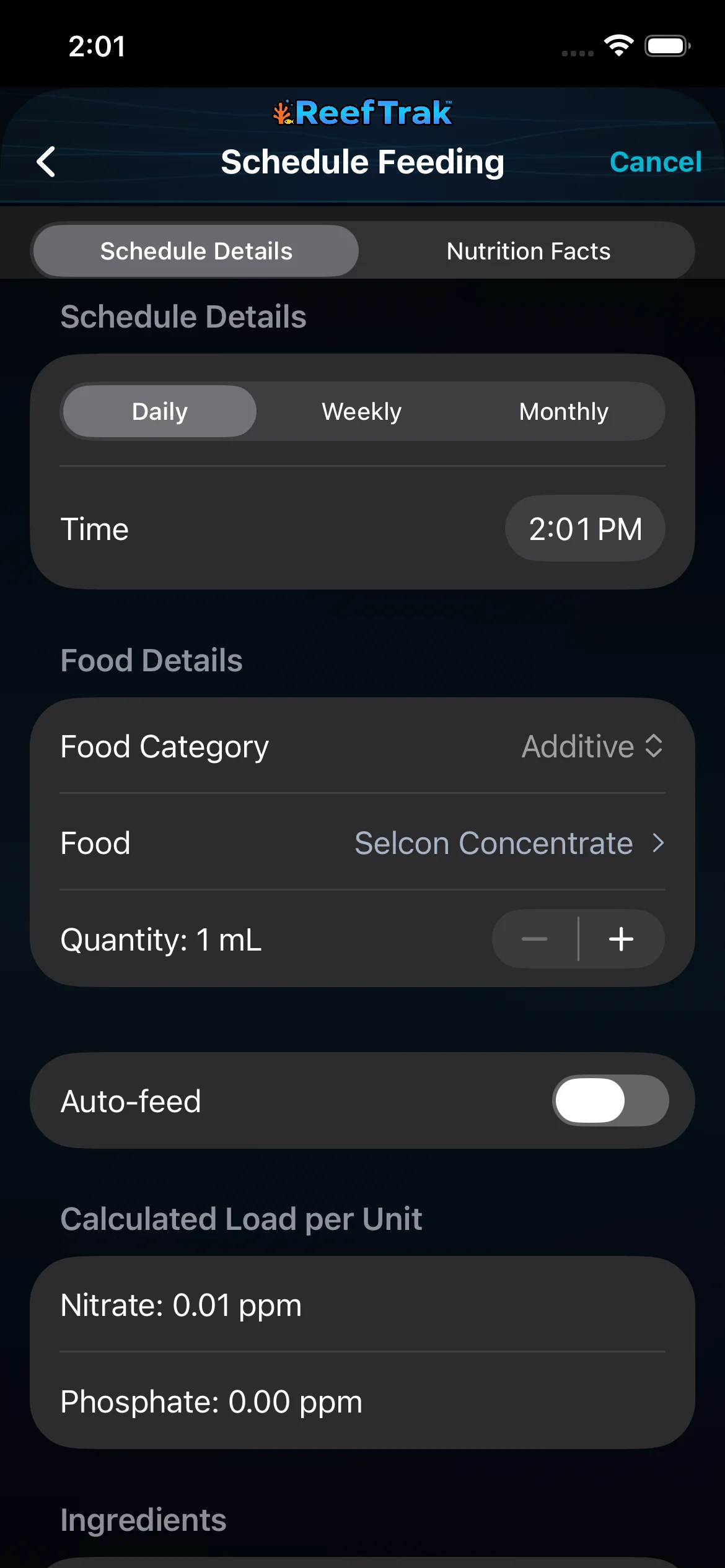 234
234
- Choose Daily, Weekly, or Monthly and set the intended time.
- Choose the actual food and quantity used by this routine.
- Turn on Auto-feed only when an automatic feeder performs this feeding.
Example
A keeper creates a daily pellet feeding at 6:00 PM for an automatic feeder and a separate weekly frozen-food routine completed by hand. The two schedules describe different execution methods without hiding which tasks still require a person.
Important details
- Premium care feature on supported Reef Trak platforms.
- A schedule is not proof that animals were fed. Confirm completion or review the resulting task history according to the workflow shown in the app.
- Nutrition and nutrient-load values are supporting estimates; livestock condition, uneaten food, and measured water quality still require observation.
Feeding Schedules frequently asked questions
When was Feeding Schedules introduced in Reef Trak?
Feeding Schedules was first documented in Reef Trak on July 17, 2025. The supporting chronology identifies it as a public ios 1.3 release.
Can Reef Trak schedule daily aquarium feeding?
Yes. Scheduled Feeding supports daily routines and also provides weekly and monthly cadence choices with a selected time.
What does Auto-feed mean in a feeding schedule?
Use Auto-feed when an automatic feeder, rather than a person, is expected to perform that scheduled feeding. It describes the method; it does not verify that the device dispensed correctly.
Should I schedule a feeding that happened only once?
No. Use Log One-Time Feeding for a single event. Scheduled Feeding is for a routine that should repeat.
Can a feeding schedule include a specific food and quantity?
Yes. The schedule connects its cadence and time to the selected food category, food, and per-occurrence quantity, with nutrition context where available.
Open in Reef Trak
The button opens this destination when the installed app supports it. The browser fallback offers only platforms where the current inventory confirms availability.