
A partnership made in the tank
You know the routine. Check the controller. Open the lighting app. Look at the last alkalinity test. Try to remember whether the filter was cleaned this week or last week. Each piece tells you something useful, but putting the whole picture together takes work.
That is the idea behind Reef Trak and Node ONE working together. Node ONE brings compatible equipment into a dedicated aquarium dashboard. Reef Trak keeps the longer record: tests, dosing, maintenance, livestock, photos, and the observations that give those numbers meaning.
Both come from Reef Research Labs, so we can build the connection around the way a reef keeper actually works. The equipment view and the tank record belong in the same daily routine.
Node ONE beside the reef, Reef Trak wherever you keep your records
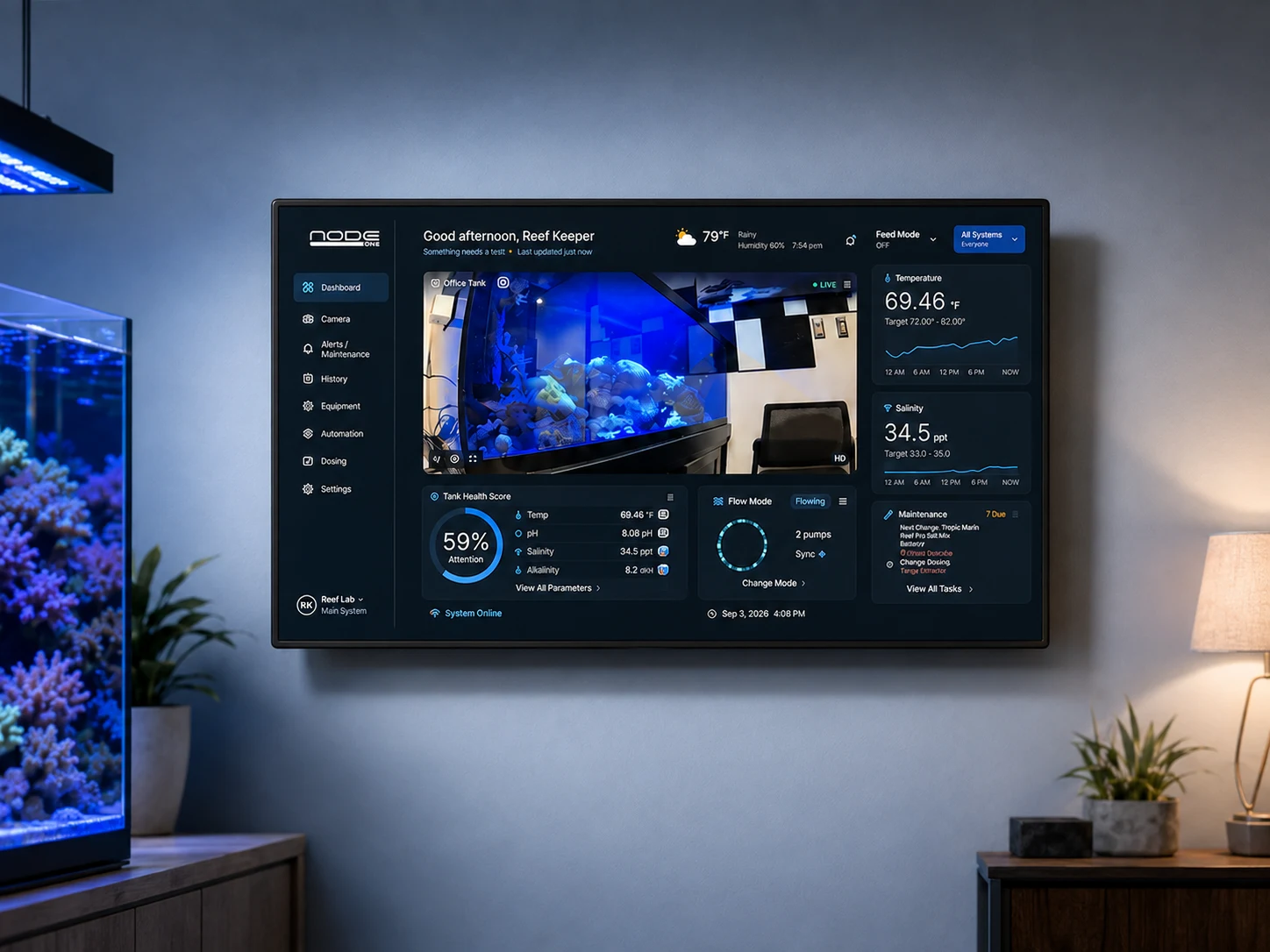
Node ONE is an always-on local aquarium server with a built-in touchscreen. It connects supported equipment and presents the readings and functions available from those integrations. That gives you a place beside the tank to check the aquarium without first finding the right app for each device.
Reef Trak is the aquarium record you build over time. A saved water test, a dosing entry, a new coral, a photo, and a maintenance task all add context that a device reading alone cannot provide. You can review that record on supported phones and through the web portal.
Together, the two products make it easier to move from “What is the equipment reporting?” to “What else has happened in this tank?” The goal is a more useful picture of your reef, built from your own equipment and your own records.
The connection works in both directions
With the tank paired and the supported bridge configured, selected equipment information can travel from the local installation into Reef Trak. Device status, supported sensor readings, and available history give the aquarium record a connection to what the equipment is reporting.
Reef Trak also supplies tank context back to the paired installation. That includes the tank’s expected parameter ranges, saved water-test results and available test history, and its maintenance tasks. Compatible Node ONE software can use that information for tank-side views.
This matters because plenty of useful aquarium information starts with you. A nitrate test from a handheld kit is still valuable even if there is no networked nitrate sensor. A pump-cleaning reminder is still useful even if the pump cannot report that it needs cleaning. Recording those details in Reef Trak gives the connected display more of the context you already maintain.
- Equipment toward Reef Trak: selected supported device status and readings.
- Reef Trak toward Node ONE: tank ranges, logged tests, and maintenance context.
- The companion: a convenient route into the Node ONE dashboard and equipment setup.
A familiar doorway into your equipment
The Node ONE companion area is available in Reef Trak on iOS, Android, and the web. Enter your Node ONE address and use the shortcuts to open its dashboard, add equipment, or view the equipment list. The companion remembers the address on that device or browser and gives you a route back to tank tracking.
On the phone, the Node interface opens in an in-app browser view. On the web, it opens in a separate tab. Equipment discovery and configuration happen on your Node ONE, while Reef Trak provides the entry point.
The newer equipment setup flow also brings Node ONE, Home Assistant, and manually tracked equipment into one connection screen. Whether a device is connected or simply recorded in your inventory, there is a clearer place to start.
Opening a Node address and pairing tank data are separate steps. A local address works when your device can reach the Node on the network. An HTTPS remote address needs remote access to have been configured already; typing a local address does not create that access.
What that looks like on an ordinary reefkeeping day
Imagine a Saturday morning tank check. You glance at the supported equipment readings on Node ONE, then test alkalinity with your usual kit and save the result in Reef Trak. Once the paired connection updates, the saved test can join the tank-side context instead of remaining a number on a scrap of paper.
You also have a pump-cleaning task scheduled in Reef Trak. The connected maintenance view can bring that reminder to the place where you do the work. Displaying a task does not complete it; you still record the care you actually performed.
Later, you notice a change in the reef and review your testing, dosing, maintenance, and photos in Reef Trak. Having those records together helps you see what happened before and after the change. It supports better questions and more informed decisions, without pretending that two events occurring together prove a cause.
This is an example of the workflow, not a promise that every device supplies every measurement. What appears depends on the equipment, the integration, the paired tank, and the information you have chosen to record.
Your aquarium, your selected information
The bridge is tied to the owner and the paired tank. The useful connection is between selected aquarium equipment and that aquarium’s records. It is not a reason to include unrelated household devices in your reef dashboard.
A connected reading also needs context about its age. Check timestamps and connection status when interpreting a value, particularly after a network interruption. A saved test is a historical observation, and an old device reading should never be treated as a fresh measurement simply because it is still visible.
Local and remote access have different dependencies. Locally connected equipment may remain available when the internet is interrupted, while manufacturer-cloud integrations, cloud synchronization, and remote access depend on their respective services.
Know what each connection does
The Reef Trak monitoring bridge brings selected information into the aquarium record. It does not turn a saved dosing entry into a command to a dosing pump. Supported equipment actions happen through the Node ONE interface and the capabilities of the specific integration.
Keep the controller’s own programs and safeguards in place. Support depends on the exact equipment model, controller revision, and connection method, so check those details when setting up a device. The companion makes the route into setup easier; it does not make every aquarium product compatible.
That clear division lets each part do a useful job: equipment performs its supported functions, Node ONE brings connected views together, and Reef Trak preserves the history you need to care for the aquarium.
A more connected way to care for your reef
The strength of this partnership is continuity. You can check equipment beside the tank, open its setup from Reef Trak, and keep the tests and care records that help explain what you are seeing. The time you spend logging a result or scheduling maintenance becomes useful in more than one place.
Already using Reef Trak? Explore the Node ONE companion and the product guide below. Already setting up a Node ONE? Connect the correct tank and supported equipment, then bring your testing and maintenance routine into Reef Trak.
A partnership made in the tank, with your reef at the center of it. Love Your Reef, Trak it.