
What is the best reefing app?
For reef keepers who want one place for the whole tank and no recurring app bill, our recommendation is Reef Trak. Its free core covers tank and parameter records; the $9.99 lifetime unlock adds the premium tools. That combination is especially useful when your reef history needs to stay with you for years.
There is a different good fit for each priority. AquaticLog suits a detailed web-and-mobile aquarium log. ReefBay suits community and buying or selling livestock. Aquarimate suits native Mac and Windows access through Live. Reefability suits reefers who prefer an AI assistant inside their management app.
Updated and fact-checked: October 6, 2026. This guide is written by Joe Marino, creator of Reef Trak. We reviewed current official documentation and US store listings linked below. Recommendations reflect our experience with Reef Trak and the documented features of the established alternatives. Availability and paid tiers can differ by platform and region.
Quick picks: five established reef tank apps
| App | Best fit | Main tradeoff |
|---|---|---|
| Reef Trak | Best overall for complete reef records without a subscription | TrakAI uses a separate AI service; controller imports focus on monitoring. |
| AquaticLog | Detailed aquarium logging on mobile and the web | Compare its free limits and Pro price with the tools you need. |
| ReefBay | Reef community and a livestock marketplace | Unlimited profiles and DeepDive require a subscription. |
| Aquarimate | Native desktop access through Aquarimate Live | Multi-device Live access is an optional annual service. |
| Reefability | An in-app AI assistant and reef mapping | Check the subscription tier, Controller plan, and other purchases. |
What changed since the earlier comparison
The comparison keeps its original May 19 publication date. These are changes to the documented comparison, including corrections to older descriptions, rather than claims that every feature launched this month. Historical prices refer to the earlier published snapshot; current prices refer to the linked US listings.
| Product | Verified change |
|---|---|
| AquaticLog | ↑ $0.70 $4.29/mo → $4.99/mo↓ $6.00 $45.99/yr → $39.99/yr↑ $15.00 $134.99 lifetime → $149.99 lifetime |
| AquaticLog | ↑ Added Controller imports: “No” → read-only Apex, Seneye, AquaWiz, and HYDROS |
| AquaticLog | ↑ Added AI: “No AI” → AI insights and photo animation advertised |
| ReefBay | ↑ Added Home-screen widgets: “No” → Yes |
| Reef Trak | ↑ 2 providers ICP imports: 7 → 9 supported providers |
| AquaticLog | Broader spending reports and hourly supported controller imports now reflected in the comparison. |
| Reefability | Older $5.99/month and $24.99/year snapshot replaced by current $9.99/month and $34.99/year listings; separate Controller plans are $11.99/month and $49.99/year. |
| Reefability | Earlier “not advertised” dosing/controller cells replaced by advertised dosing, controller connections, ICP/DOC uploads and estimated PAR/flow mapping. |
Feature-by-feature comparison: all five reef tank apps
Compare the same capability across all five apps before choosing a plan. A dosing log, a calculated dose, and control of a doser are different functions. A PAR reading and an estimated light map are different kinds of evidence. The table keeps those distinctions visible instead of reducing every cell to a checkmark.
The highlighted column is Reef Trak. Competitor capabilities are taken from the official sources below. “Not confirmed” means the reviewed sources did not establish the feature, not that we proved it is absent. Features, limits, device support, and purchases can differ between iOS and Android; check the platform you will actually use.
| Capability | Reef Trak | AquaticLog | ReefBay | Aquarimate | Reefability |
|---|---|---|---|---|---|
| Parameters and trends | Yes (55+ parameters incl. trace elements) | 50+ parameters, including trace elements; targets and trend charts | ✓ | ✓ | ✓ |
| Dosing logs | ✓ | Yes, including programs and history | Yes, with dosing analytics | ✓ | Dosing records, label-based suggestions, bottle tracking and connected dosers advertised |
| Livestock tracking | Yes, with catalog and care records | Yes, with lifecycle history | Yes, in tank logs | Yes (Aquaribase) | Species care sheets, compatibility warnings and coral growth records advertised |
| Maintenance tracking | Recurring tasks with custom intervals | Recurring reminders with duration tracking | Recurring tasks and reminders | Advanced task scheduling | Custom feeding, testing and equipment-care reminders |
| Equipment records | ✓ | ✓ | ✓ | ✓ | ✓ |
| PAR tools | PAR Map | PAR light readings | Not advertised in reviewed official sources | Not advertised in reviewed official sources | 3D reef map with estimated PAR and flow; distinguish estimates from meter readings |
| Expense tracking | Yes + Receipt Scan Assist | Livestock and equipment costs; spending reports by store, tank and date (Pro) | Spending analytics | ✓ | Receipt-based livestock entry advertised; general expense reports not confirmed |
| Home-screen widgets | ✓ | ✓ | ✓ | Not advertised in reviewed official sources | ✓ |
| Controller integrations | Read-only Apex + HYDROS; Alkatronic, Mastertronic, and AquaWiz where available; plus optional Home Assistant monitoring | Apex, HYDROS, AquaWiz and Seneye imports; iOS advertises hourly supported readings | Not advertised in reviewed official sources | Apex, Trident, Trident NP | Apex, GHL, Red Sea, HYDROS, Focustronic, AquaWiz and other connections advertised; confirm device and Controller plan |
| ICP test support | 9 providers: Aquaforest, ATI, Fauna Marin, Modern Reef, Oceamo / Reef Moonshiner, Reef Labs, Reef Zlements, Triton, Tropic Marin | Imports: Oceamo, Fauna Marin, Triton, ReefLabs | Not advertised in reviewed official sources | No ICP import advertised; Hanna Marine Master result import supported | ICP and DOC report uploads advertised; check lab format and plan |
| Marketplace / product search | ReefDock multi-retailer product search | Community product catalog and reviews | Peer-to-peer and vendor marketplace | Not advertised in reviewed official sources | Not advertised in reviewed official sources |
| AI approach | TrakAI: export to the user's chosen AI | Daily tank-context AI suggestions; photo animation also advertised | In-app AI insights | No AI feature advertised in reviewed official sources | In-app Reefer AI, photo diagnostics and tank-context analysis |
| Data export | PDF, CSV, and TrakAI markdown | ✓ | Not advertised in reviewed official sources | Backup/restore advertised; general export not confirmed | Not advertised in reviewed official sources |
| Web / desktop access | Full Web Portal at reeftrak.com | Full web app | Web community, marketplace, and public tank pages; logging promoted through the app | Aquarimate Live apps for macOS and Windows | No web app advertised |
| Pricing model | Free core + $9.99 lifetime unlock | $4.99/mo, $39.99/yr, or $149.99 lifetime | Free + DeepDive IAP price points of $4.99 / $29.99 / $39.99 | $9.99 app + optional $9.99/yr Live sync | $9.99/mo or $34.99/yr; Controller plan $11.99/mo or $49.99/yr; other purchases |
| Free access / trial | Free core; no timed trial needed | Free tier; 30 days unlimited parameter logging for new accounts; 7-day yearly Pro trial | Free app; unlimited tanks and DeepDive require subscription; no trial advertised | 100 MB cloud backup included; no Live trial advertised | Free download; current free limits and subscription trial not confirmed |
| Platforms | iOS + iPad + Android + Web Portal | iOS + iPad + Android + Web; Apple-silicon Mac compatibility | iPhone + iPad + Android; Apple-silicon Mac compatibility listed | iOS + Android + Mac + Windows | iPhone + iPad + Android; Apple-silicon Mac compatibility listed |
| Development history / update check | Current release history linked below; comparison checked October 6, 2026 | Long development history; current iOS and Android release notes checked October 6 | iOS release notes include September 28, 2026 updates | iOS 9.1.2 listed June 24, 2025; check each platform separately | Current Symbiosis listing checked October 6; older feature snapshot replaced |
For a controller-dependent tank, start with the integrations row and the exact device supported. For a dosing-heavy tank, read the dosing description rather than assuming every “Yes” includes concentration-aware calculations. For a large coral collection, compare placement, photos, care information, and lighting records. For several years of history, pricing and export deserve the same attention as a new feature.
Free features, lifetime pricing, and subscriptions
Start with the tools you will actually use. Free download, free parameter logging, lifetime premium, and a subscription trial are different offers. Prices below are in US dollars, checked on October 6, 2026.
| App | Free access | Paid option |
|---|---|---|
| Reef Trak | Unlimited tanks and parameters, core logs, trend charts, cloud sync, and free CSV export | Optional $9.99 one-time lifetime premium unlock; no subscription |
| AquaticLog | Free tier; new accounts receive 30 days of unlimited parameter logging | Pro: $4.99/month, $39.99/year, or $149.99 lifetime; yearly plan offers a 7-day trial |
| ReefBay | Free app; unlimited profiles and DeepDive require a subscription | DeepDive listings: $4.99, $29.99, and $39.99; the listing does not identify their billing periods |
| Aquarimate | 100 MB of cloud backup included with the paid app | $9.99 app; optional Live $9.99/year; additional backup storage is a separate purchase |
| Reefability | Free download; confirm current free limits in the app | $9.99/month or $34.99/year; Controller plan $11.99/month or $49.99/year; other purchases also listed |
A subscription can make sense when its ongoing service matters to you. A lifetime unlock keeps the app cost predictable. Either way, check which tools are included and how you can take your records with you.
See our no-subscription reef app guide for the free core, $9.99 lifetime purchase, and answers to the most common pricing questions.
Reef Trak: the all-in-one reef manager
Reef Trak Lead pick for serious reefers
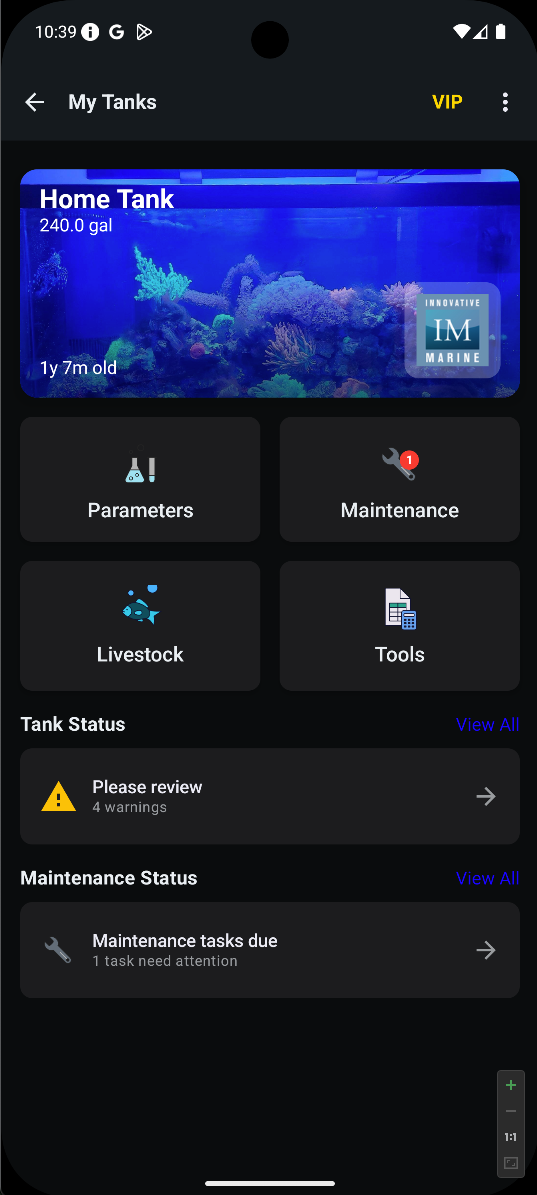
Reef Trak combines parameters with trends and stale-data flags, guided and manual dosing, livestock records, PAR Map, expense tracking with Receipt Scan Assist, home-screen widgets, read-only Apex Fusion and HYDROS imports, Alkatronic, Mastertronic, and AquaWiz integrations where available, Home Assistant monitoring, ReefDock multi-retailer product search, a full Web Portal at reeftrak.com, and the TrakAI export workflow. All are connected in one system across iPhone, iPad, Android, and the web.
The pricing model is deliberately built for reef keepers, who tend to keep tanks running for many years: most of the app is free, and a one-time $9.99 unlock turns on premium features for life. No recurring fee. The app cost stays predictable, and free CSV export provides a usable copy of measurement records.
Reef Trak continues to ship updates documented in its public release history. Recent additions include Tank Insights, chart event overlays, TrakShare, and Home Assistant integration, with Node One adding confirmed local control for supported switches. Its differentiator is the way those tools connect with PAR Map, Receipt Scan Assist, multi-vendor controller imports, and the bring-your-own-AI export pattern rather than any claim that competitors have stood still.
Best for: reef keepers who want one app that covers the whole tank lifecycle (testing, dosing, maintenance, livestock, equipment, lighting, expenses, product search, AI) without locking into a particular AI engine or a monthly bill.
A connected reef record: what that looks like in practice
Suppose alkalinity has drifted for two weeks. You want more than today’s number. Review the tests, the dosing amounts, the water changes, and anything you added to the tank over the same period. That is the workflow Reef Trak is built around.
Or take a coral that is losing color. Its purchase date, photos, placement notes, PAR readings, and water history give you a much better starting point than an isolated parameter alert. A mapped PAR measurement is a record of a reading; a software estimate of PAR is a different tool.
- Parameters: keep manual tests and supported controller readings in one history.
- Dosing and maintenance: record amounts, schedules, water changes, and equipment care.
- Livestock and lighting: keep care notes, progress photos, and PAR readings with the tank.
- Expenses and reports: keep receipts and export records for a second opinion or future reference.
You can inspect the public feature guides and release notes below before choosing the app. They show the workflows behind the recommendation.
AquaticLog: the 13-year veteran
AquaticLog
AquaticLog is the long-standing heavyweight in reef tracking. The current feature set includes 50+ water parameters, ICP imports from Oceamo, Fauna Marin, Triton, and ReefLabs, recurring maintenance and dosing programs, livestock lifecycle and equipment records, data export, photo journaling, home-screen widgets, daily AI suggestions, and a full web app. Its iOS listing advertises hourly supported controller readings from Apex, Seneye, AquaWiz, and HYDROS, and its spending reports now cover store, tank, and date filters. The earlier no-controller description was outdated.
US App Store pricing is now $4.99 per month, $39.99 per year, or $149.99 lifetime. The yearly plan has a 7-day Pro trial, while new accounts receive 30 days of unlimited parameter logging and can continue on a limited free tier. The lifetime option costs fifteen times Reef Trak's $9.99 lifetime unlock, but AquaticLog now offers materially more controller and AI functionality than this article previously credited.
Best for: reefers who want a mature web-and-mobile logger with professional ICP workflows, multiple read-only controller connections, and a choice between subscription and lifetime pricing.
ReefBay: marketplace and community focus
ReefBay
ReefBay's real differentiator is the marketplace and community side. The app combines tank tracking, AI-powered insights, community forums, and a buy-and-sell marketplace for corals, fish, and inverts with both hobbyist sellers and vendor shops. Its website advertises more than 10,000 reefers and 30 vendor partners.
For a reefer who shops actively (buying frags, selling propagations, looking for hard-to-find coral from other hobbyists), ReefBay is purpose-built for that flow. Its tracking tools have also expanded: current official sources show date-filtered parameter charts, tank-log analytics for dosing and spending, recurring maintenance reminders, livestock and equipment histories, and home-screen widgets. Unlimited tank profiles and DeepDive features require a subscription; the US App Store currently lists DeepDive in-app purchase price points of $4.99, $29.99, and $39.99 without clearly labeling each billing period.
Best for: reefers whose primary value is the peer-to-peer marketplace and community discussion, with tank tracking as a useful secondary feature.
Aquarimate: native desktop support plus Apex and Trident imports
Aquarimate
Aquarimate is the long-running reef and aquarium logger with the broadest native platform support: dedicated iOS, Android, macOS, and Windows apps. Solid feature coverage of parameters, tasks, analytics with trend graphs, the Aquaribase species database, livestock and equipment records, dosing logs, expense tracking, and photo galleries.
Aquarimate is a $9.99 one-time app purchase with an optional Aquarimate Live subscription at $9.99 per year for real-time access across devices. The app also includes 100 MB of cloud backup storage without requiring Live. Official sources reviewed on October 6, 2026 do not advertise an AI feature.
Aquarimate added support for multiple Apex, Trident, and Trident NP controllers across aquariums, including nitrate and phosphate from Trident NP. It also imports results from the Hanna Marine Master tester. The latest iOS version listed during this review was 9.1.2 from June 24, 2025.
Best for: hobbyists who want native Mac and Windows apps, detailed manual records, and Apex/Trident data in the same aquarium-management system.
Reefability: in-app AI, reef mapping, dosing and connected tools
Reefability
Reefability’s current Symbiosis listing presents a broader reef manager than the earlier comparison described. It advertises parameter history, livestock care and compatibility information, coral growth records, dosing suggestions, bottle tracking, and connected dosers. Reefer AI uses tank context rather than presenting an isolated chemistry number, while photo tools address livestock and pest identification.
The mapping workflow creates a model from a tank photo and estimates PAR and flow at coral positions. Those estimates are different from recording measurements taken with a PAR meter. The listing also advertises ICP and DOC report uploads and connections to Apex, GHL, Red Sea, HYDROS, Focustronic, AquaWiz and other equipment. Those are vendor-advertised capabilities; verify your exact hardware, lab format, platform, and plan before depending on them.
Current US purchase listings show $9.99 monthly or $34.99 yearly, with separate Controller plans at $11.99 monthly or $49.99 yearly and additional purchases. General tank-data export and a separate full web manager were not confirmed by the reviewed sources. The website also describes custom care reminders and AI-guided nutrient analysis.
Compared with Reef Trak: Reefability puts its assistant and estimated reef map inside the app. Reef Trak emphasizes recorded measurements, connected care history, portable reports, and an inspectable export to your chosen AI. These workflows are comparable in purpose but different in how the evidence is gathered and how you interact with it.
Best for: reefers who prefer an integrated AI workflow and want to assess its mapping and connected-tool features. Check feature entitlements and controller costs against the exact setup you intend to use.
Controller imports, ICP records, and data access compared
A controller connection, a photo of a test result, a manually entered ICP result, and an imported lab report are different workflows. The table describes what the reviewed official sources document. “Not confirmed” means the sources did not establish the capability, not that it cannot exist.
| App | Controllers and lab results | Desktop or web access | Data portability |
|---|---|---|---|
| Reef Trak | Read-only Apex and HYDROS imports; supported tester integrations and ICP imports | Web portal | Free CSV and PDF reports; premium TrakAI exports |
| AquaticLog | Apex, HYDROS, AquaWiz, and Seneye imports; ICP records | Web app | Export documented; check the required tier |
| ReefBay | Direct controller and ICP imports not confirmed | Web community and marketplace; tank logging promoted in the app | General tank-data export not confirmed |
| Aquarimate | Apex, Trident, Trident NP, and Hanna Marine Master imports | Native Mac and Windows access through Live | Cloud backup and restore; general export not confirmed |
| Reefability | Controller connections and ICP/DOC report uploads advertised; confirm device and tier | A separate full web manager not confirmed | General tank-data export not confirmed |
TrakAI versus in-app AI: a detailed workflow comparison
AquaticLog advertises daily AI suggestions, ReefBay offers DeepDive, and Reefability has Reefer AI. The relevant distinction is how each workflow uses your records, what you can inspect, and where you ask follow-up questions. An in-app assistant can be convenient; an external export gives you a different kind of control.
Reef Trak does it differently. TrakAI exports months of your actual tank history. Current parameters with trend deltas. Your full dosing regimen. Livestock with species and ages. A 30-day maintenance log with timestamps and quantities. Measurement statistics with frequency and ranges. Feeding records. The export is one structured markdown document with embedded persona instructions. You paste it into whichever AI engine you trust, ChatGPT, Claude, Gemini, Perplexity, a local LLM, or whatever next-generation model ships tomorrow.
Compare the workflows dimension by dimension. The in-app column describes implementation questions to check with the vendor, not a claim that every competing assistant has identical limits.
| Dimension | In-app AI workflow | Reef Trak TrakAI |
|---|---|---|
| LLM choice | The app vendor selects and manages the model | User chooses ChatGPT, Claude, Gemini, Perplexity, or a compatible local model |
| Prompt control | The vendor controls the in-app workflow | User can ask follow-up questions and change the prompt in the chosen AI service |
| Data scope | The app decides which stored records reach its AI feature | Inspectable tank-history export covering parameters, dosing, livestock, maintenance and feeding; check the selected period |
| Recurring app cost | Depends on product and tier; DeepDive and Reefer AI have paid plans | No additional Reef Trak AI fee; the chosen AI service may have its own cost |
| Model updates | The vendor must update its integration when it changes models | The user can move the same export to another compatible model |
| Data visibility | Depends on what the vendor exposes about its integration | User can inspect the exact markdown document before sharing it |
| Everyday convenience | Questions stay inside the reef app, where supported | Export your records, open the chosen service, and share the document |
| Sharing and privacy | Check the vendor’s stated data handling and what reaches its AI | Review the export before sharing; the receiving service has its own data policy |
A useful AI question might be: “Alkalinity has fallen for two weeks even though dosing increased. Which dates show the change, and what maintenance happened around it?” The answer is more useful when the supporting test dates, dosing records, and care events are available to inspect. That is the practical reason to care about export scope rather than judging an assistant by how confidently it writes.
With TrakAI you can read the exact document, remove information you do not want to share, and reuse it with another compatible service. You also take responsibility for that sharing step. No AI workflow turns an incomplete tank history into reliable measurements; keep checking the underlying tests and observations.
ReefDock: retailer product search alongside tank management
ReefDock provides reef-product search across retailers including BRS, Amazon, Saltwaterfish, and Petco at reefdock.com/shop. It is useful when finding equipment, additives, food, and livestock from one search surface. A retailer listing helps you locate an item; its seller still supplies the current price, availability, and purchase terms.
That differs from ReefBay’s peer-to-peer and vendor marketplace. A reefer buying a frag from another hobbyist has a different need from a reefer locating a replacement pump at a retailer. ReefBay is the marketplace choice in this comparison; ReefDock is the retailer-search companion. Product search does not imply that purchases are automatically imported into your tank records.
For the management side, keep the equipment purchase date, receipt, setup notes, and maintenance history with the tank. Finding the product is only the first step. Being able to connect that purchase to later husbandry changes is where the record becomes useful.
What to look for when choosing
Across this comparison, ten practical checks help you choose an app for a mature reef. Try them with your real setup, rather than choosing from screenshots alone:
- Parameter coverage and history depth. Not just chartable values, but multi-week views, custom ranges, and the ability to find a single test from eighteen months ago.
- Dosing logs connected to parameter results. Cause and effect visible side by side.
- Livestock records with care information. Sources, dates, photos, notes, per-tank assignment, not just a flat list of names.
- Equipment records with maintenance schedules. When did that probe go in, when was the last bulb change.
- Maintenance scheduling that understands intervals. Weekly water changes, fortnightly socks, monthly probe calibrations, yearly deep cleans.
- Supported controller imports. Verify the exact controller or tester, the readings imported, the sync interval, and whether the connection monitors or also controls hardware.
- AI workflow grounded in your records. Check the history and dates included, visibility into shared data, and whether the assistant stays inside the app or uses an export.
- Cross-platform with cloud sync. Phone at the tank, computer at the desk, web portal anywhere.
- Long-term pricing model. Subscription is fine if value compounds monthly. Lifetime is better when five years of reef history is on the line.
- Active development. Check the actual date and substance of recent releases, not a general claim about update cadence.
Where Reef Trak fits
Reef Trak is built around all ten criteria above. Parameters with multi-week history and custom ranges. Dosing logs tied to parameter trends. Livestock records with built-in care info for hundreds of species. Equipment tracking. Maintenance schedules with custom intervals up to yearly tasks. Read-only Apex Fusion and HYDROS imports, Alkatronic, Mastertronic, and AquaWiz integrations where available, plus Home Assistant integration and Node One local control for supported switches. TrakAI exports that work with compatible AI engines. ReefDock multi-retailer product search. iOS, iPad, Android, and a full Web Portal at reeftrak.com with cloud sync. A one-time $9.99 lifetime unlock with no subscription.
For broad connected reef records and predictable app pricing, Reef Trak is our overall recommendation. AquaticLog remains a substantial web-and-mobile logger, ReefBay centers community commerce, Aquarimate offers native desktop access through Live, and Reefability puts an assistant and estimated reef map inside the app. Use the detailed feature matrix to compare the tools you will actually use, then test your own controller, lab, and export workflow.